 Login
LoginKDE Plasma 6.6 Turns Spectacle Into an OCR Tool and Ships a New Setup Wizard
18 February 2026 at 18:19

The release also includes a new color blindness filter, an on-screen keyboard, and better high refresh rate display handling.
 Calculate Linux is a Gentoo-based family of three distinguished distributions. Calculate Directory Server (CDS) is a solution that supports Windows and Linux clients via LDAP + SAMBA, providing proxy, mail and Jabbers servers with streamlined user management. Calculate Linux Desktop (CLD) is a workstation and client distribution (with a choice of Cinnamon, KDE Plasma, LXQt, MATE or Xfce desktops) that includes a wizard to configure a connection to Calculate Directory Server. Calculate Linux Scratch (CLS) is a live CD with a build framework for creating a custom distribution.
After almost 4 months of development, KDE announced the new major 6.6 version of its Plasma desktop yesterday.
The new version of this popular Linux desktop environment introduced a new on-screen keyboard (aka virtual keyboard), that will be automatically enabled when there’s no real keyboard detected.
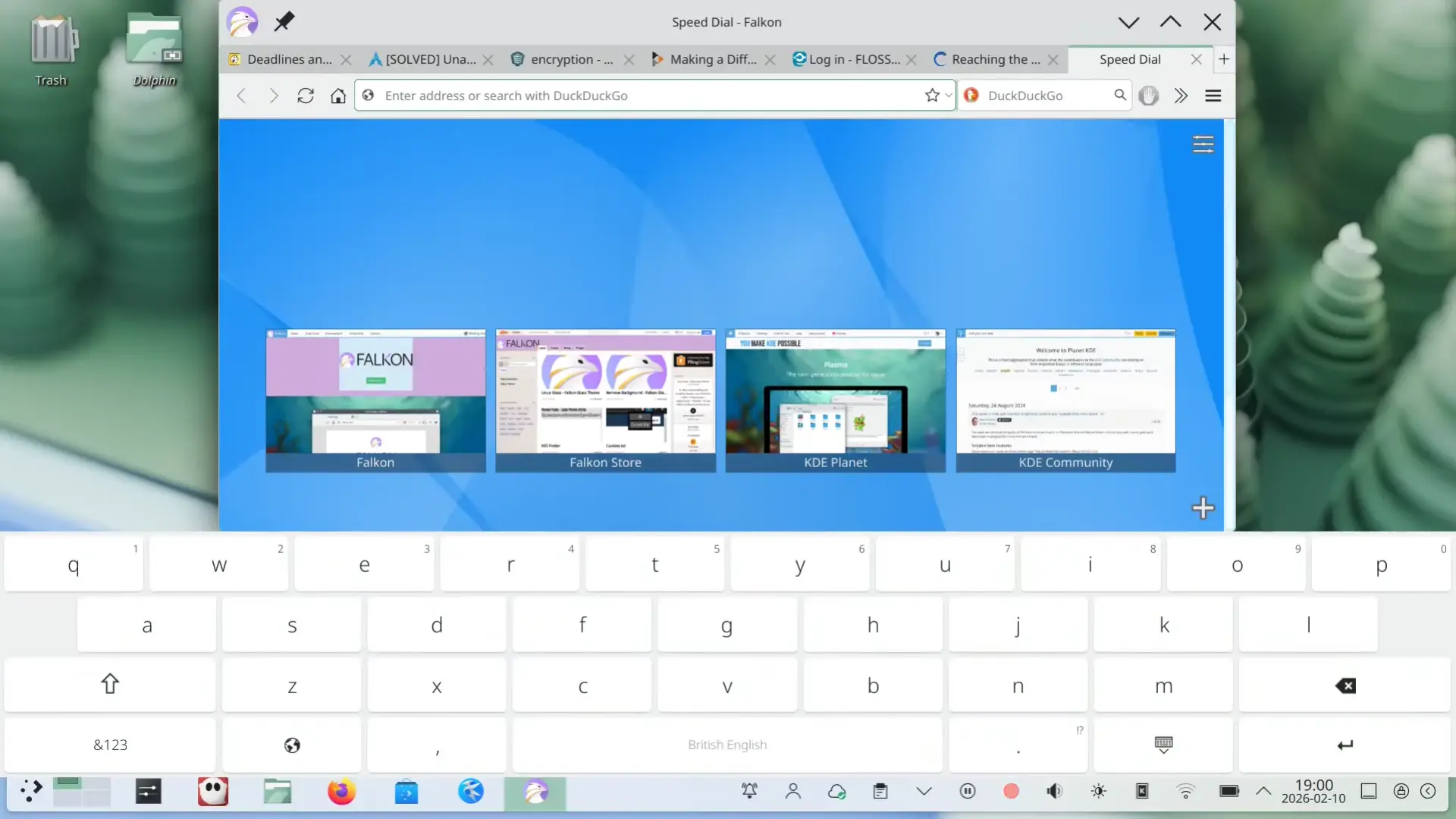
Plasma new on-screen keyboard (image from kde.org).
Spectacle, the built-in screenshot tool now has OCR support. After installed tesseract package, user can enable the Text Recognition (OCR) feature in the configuration dialog, then use it to extract text from screenshots.
During screen area selection, it now also provides a on-screen “Cancel” button which is useful for touchscreen users. And, for any app window, a new “Hide from Screencast” option is added into the window header right-click menu, allowing to except that window from screenshot.
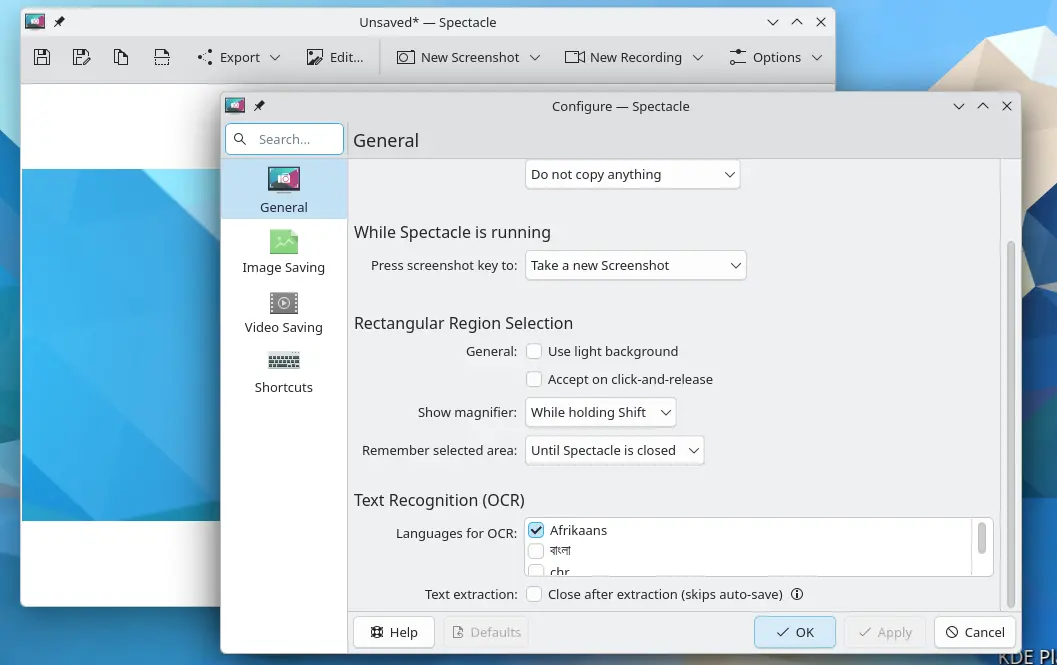
Spectacle now has OCR support
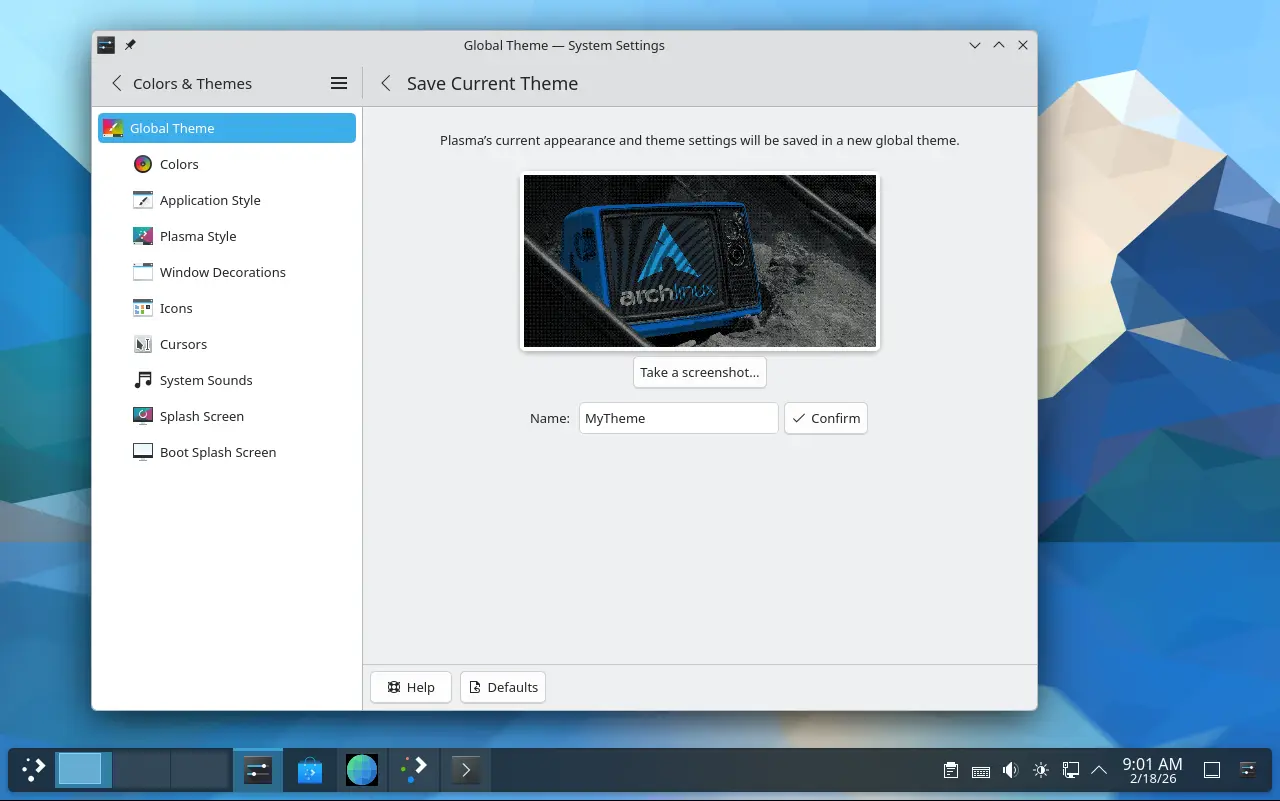
In the Colors & Themes settings page, you’ll see a new “Save Current Theme” button, allowing to save current settings (e.g., colors, window decoration, icons, cursors, desktop and window layout) as a custom global theme with custom name and thumbnail image.
Your saved themes are displayed as the global theme choices. And, they can be used for the day and night theme switching feature.
The new version also introduced Plasma Setup, a new first-run wizard for Plasma desktop, to create user account, connect to network, and configure other important things after installed the desktop environment.
The Windows List widget has been updated with Open on Hover option, and ability to filter out windows not on the current desktop or activity. Zoom and Magnifier now has a new tracking mode, always keep the pointer at center of screen.
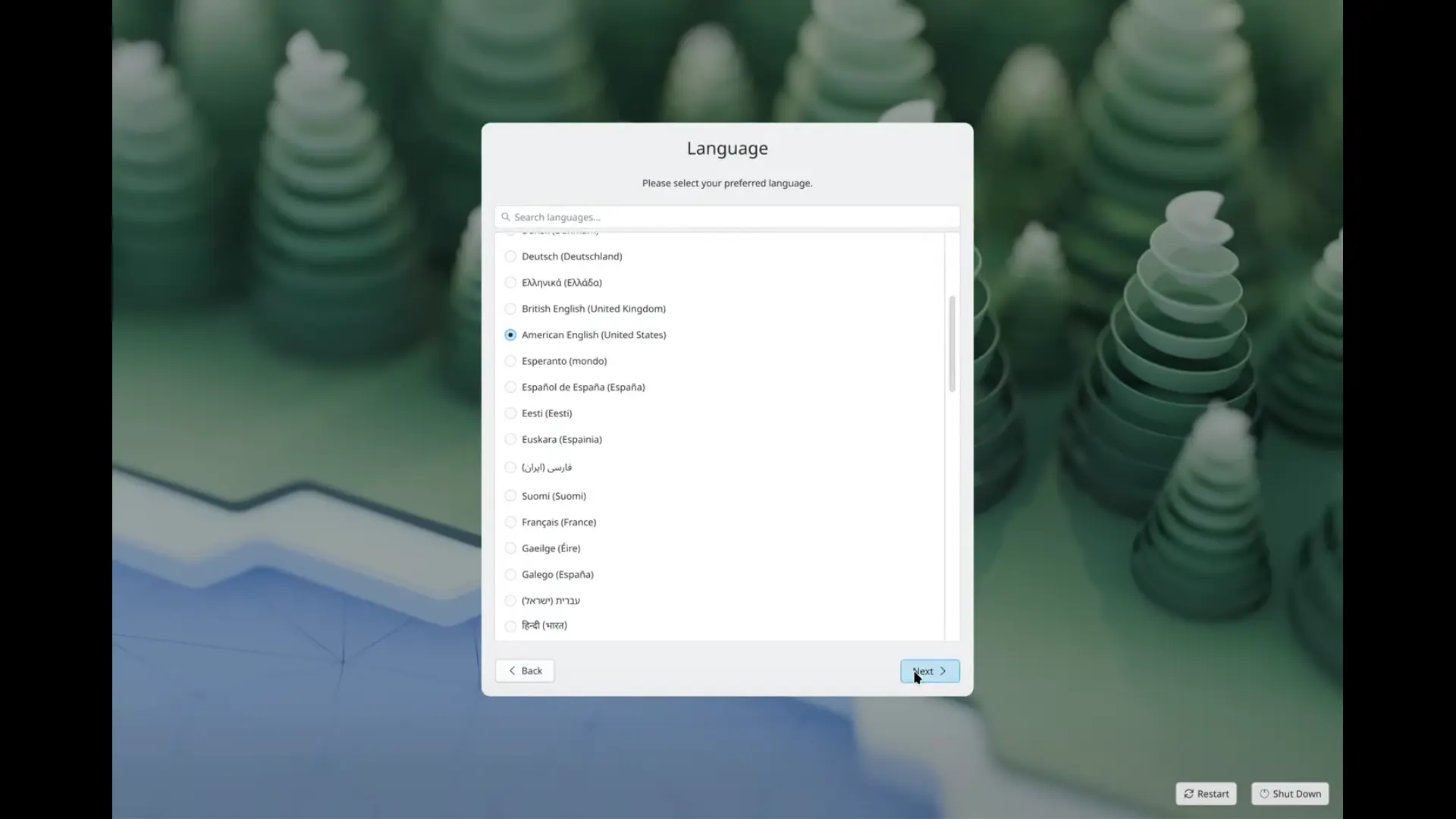
Initial setup useful for first time using the system
Other changes include optional new plasma login manager, better high-refresh-rate screen support, as well as:
For more about Plasma 6.6, see the official announcement in KDE website.
The source tarballs for the new desktop release are available to download at KDE web-site via this link page.
As a Linux user, it’s recommended to wait for your distribution updates. Arch Linux has made Plasma 6.6 into its official Extra repository, and, Fedora has built it for the next 44 version.
For Ubuntu, plasma desktop is available through the community maintained universe repository. If Debian upstream includes plasma 6.6 before the Ubuntu 26.04 package import deadline, then the new desktop will be available in next KUbuntu 26.04.
KUbuntu also has an official PPA that backports new versions of KDE Platform, apps, and frameworks for the most recent KUbuntu release. Though, it probably won’t make 6.6 for current 25.10 due to Qt version mis-match.
GobMis GNU/Linux is a Linux distribution adopted to the needs of public administration offices in the Misiones province of Argentina. It is based on Devuan and uses the Xfce desktop environment. The distribution comes with a NextCloud and OpenVPN-based client software that connects to central work servers, as well as a selection of applications commonly used in government offices. The project uses free software and open document standards, and it also supports the objectives of sustainable development. GobMis GNU/Linux is available publicly and without any cost, inclusive of extensive documentation. MODICIA O.S. is a Linux multimedia distribution designed primarily for musicians, graphic designers and video makers. It is based on Debian's "stable" branch, but uses the Cinnamon desktop and a recent Linux kernel. MODICIA O.S. comes with a set of carefully-selected, open-source multimedia software and tools, such as Audacity (audio editor), Brasero (disc-burning utility), Cheese (webcam application), Curlew (multimedia converter), GIMP (graphics editor), HandBrake (video transcoder), Kdenlive (video editor), MediaInfo (tool that provides technical data about media files), mpv (media player), Peek (animated GIF recorder), RawTherapee (photo processor), XnView (image viewer), and many others. The distribution also integrates the OnlyOffice software suite for general office tasks. CentOS as a group is a community of open source contributors and users which started in 2003 and has been sponsored by Red Hat since 2014. CentOS Linux versions up to CentOS Linux 8 are 100% compatible rebuilds of Red Hat Enterprise Linux, in full compliance with Red Hat's redistribution requirements. In 2020 it was announced CentOS Linux is being discontinued and replaced with CentOS Stream, a developer-focused distribution which acts as a middle-stream between Fedora and Red Hat Enterprise Linux.
Libinput, the input device management library for most modern Linux distributions, released new 1.31.0 version few days ago.
The new version of this input handling library added support configuring the timeouts of disable-while-typing and disable-while-trackpointing, allowing to set how long the touchpad or trackpoint should be should be inactive after key presses.
The feature of “disable touchpad while typing” is usually enabled by default in recent Ubuntu, Fedora etc distributions. The default “long” time-out after a key press + release is 500 ms, which is however bit short that can still causes mis-clicks while typing in some cases.
The new 1.31.0 version added two C API calls (listed below), making the first step for the adjustable timeout.
libinput_device_config_dwt_set_timeoutlibinput_device_config_dwtp_set_timeoutCurrently, the timeout can be set from 100 ms to 5000 ms (5 seconds), and, it’s intended for developer use. Meaning, it still needs some time for the feature being available to end-users.
Since version 1.28.0, libinput supports 3-finger (or 4-finger) dragging feature, allowing to move app window by dragging on touchpad. The feature is disabled by default because it would override the 3-finger swipe gestures that are enabled by default in many desktop environments.
With new 1.31.0, a new “fast swipe” feature is introduced. So that when you have 3-finger dragging feature enabled, 3-finger move quickly on touchpad still can trigger swipe gestures to do switch desktop, open overview etc actions.
The feature also works when you have libinput with 4-finger dragging enabled.
3 finger drag won’t override swipe anymore (AI generated image)
The version also added new API to get a tablet tool’s (marketing) name. And, for touchpad with INPUT_PROP_PRESSUREPAD property set (available in libinput 1.30.1 + Kernel 6.18 or higher), it will now assume it to be a pressure pad.
Other changes in libinput 1.31.0 include:
For more about the new release, as well as the source tarball, go to libinput project page via the link below:
For Ubuntu users who want to try out the new libinput library, keep an eye on this unofficial PPA. I’m going to update it in next few hours, but for testing only!
To add the PPA and update libinput, use commands (Ctrl+Alt+T):
sudo add-apt-repository ppa:ubuntuhandbook1/libinput
sudo apt update
sudo apt install libinput-bin libinput-tools libinput10
Then log out and back in to apply change.
If anything goes wrong, purge the PPA to go back the original libinput library:
sudo apt install ppa-purge
sudo ppa-purge ppa:ubuntuhandbook1/libinput
MidnightBSD is a FreeBSD-derived operating system. A critical goal of the project is to create an easy-to-use desktop environment with graphical ports management, and system configuration using GNUstep. The vast majority of the operating system will maintain a BSD license. MidnightBSD was forked from FreeBSD 6.1 beta.
KDE Plasma 6.6 desktop environment is now available with numerous new features and improvements across all components and apps. Here's what's new!
The post KDE Plasma 6.6 Desktop Environment Officially Released, This Is What’s New appeared first on 9to5Linux - do not reproduce this article without permission. This RSS feed is intended for readers, not scrapers.
In this article, you will learn how to list, configure, enable, disable, and troubleshoot network interfaces in Linux using 15
The post 15 Useful “ifconfig” Commands to Configure Network Interface in Linux first appeared on Tecmint: Linux Howtos, Tutorials & Guides. Founded in 2014 by Oliver Pinter and Shawn Webb, HardenedBSD is a security-enhanced fork of FreeBSD. The HardenedBSD Project is implementing many exploit mitigation and security technologies on top of FreeBSD. The project started with Address Space Layout Randomization (ASLR) as an initial focal point and is now implementing further exploit mitigation techniques. NuTyX is a French Linux distribution (with multi-language support) built from Linux From Scratch and Beyond Linux From Scratch, with a custom package manager called "cards". The package manager can install individual binary packages, a group of related binary packages (e.g. desktop packages, such as KDE or Xfce), and compile source packages from "ports". The distribution is designed for intermediate and advanced Linux users.
Lutris 0.5.20 is now available for download with support for Steam Families, D8VK in Proton, as well as other new features and improvements for Linux gaming.
The post Lutris 0.5.20 Game Manager Adds Support for Importing Commodore 64 ROMs appeared first on 9to5Linux - do not reproduce this article without permission. This RSS feed is intended for readers, not scrapers.
