 Login
LoginXubuntu 24.04.4
12 February 2026 at 20:17
 Xubuntu is a community-developed operating system based on Ubuntu. It comes with Xfce, which is a stable, light and configurable desktop environment.
 Xubuntu is a community-developed operating system based on Ubuntu. It comes with Xfce, which is a stable, light and configurable desktop environment. Ubuntu Unity is a flavour of Ubuntu featuring the Unity desktop environment (the default desktop environment developed and used by Ubuntu from 2010 to 2017). Unity debuted in the netbook edition of Ubuntu 10.10; it was initially designed to make more efficient use of space given the limited screen size of netbooks, including a vertical application switcher called "the launcher" and a space-saving horizontal multipurpose top menu bar. Ubuntu switched from Unity to GNOME in 2017, but the desktop was resurrected again as an unofficial "Ubuntu Unity Remix" in 2020. It became an official flavour of Ubuntu during the development cycle of Ubuntu 22.10 in 2022. An official variant of Ubuntu, Ubuntu Studio is a Linux-based operating system for creative individuals in the areas of audio production, video production, graphics design, photography and desktop publishing. It makes professional audio accessible on Linux; it uses the JACK sound server and a kernel built with a low-latency patch. Up until version 20.10 Ubuntu Studio shipped with the Xfce desktop environment, but this was replaced by KDE Plasma in October 2020. Ubuntu MATE is a desktop Linux distribution which aims to bring the simplicity and elegance of the Ubuntu operating system through a classic, traditional desktop environment - the MATE desktop. MATE is the continuation of the GNOME 2 desktop environment which was used as Ubuntu's default desktop until 10.10 (when it was replaced by Unity). The project began its life as an Ubuntu "remix", but starting with version 15.04, it was formally accepted as an official member of the Ubuntu family of Linux distributions. Ubuntu Kylin is an official Ubuntu flavour whose primary goal is to create a variant of Ubuntu optimised for Chinese users (using the Simplified Chinese writing system), although it also supports other languages. The default desktop is called UKUI (Universal Kylin User Interface) which is based on MATE desktop and is developed with the Qt toolkit. UKUI strives to adhere to the friendly-and-simple design concept. The distribution also includes more than 20 applications developed in-house, including Kylin Assistant, Kylin Video, Kylin Screenshots and Software Center. Ubuntu Cinnamon is an official flavour of the Ubuntu distribution featuring the Cinnamon desktop. The project strives to offer modern tools while providing a user-friendly desktop which will feel familiar for users coming from other operating systems, such as Microsoft Windows. Ubuntu Budgie (previously budgie-remix) is an Ubuntu-based distribution featuring the Budgie desktop, originally developed by the Solus project. Written from scratch and integrating tightly with the GNOME stack, Budgie focuses on simplicity and elegance, while also offering useful features, such as the Raven notification and customisation centre. Lubuntu is a variant of Ubuntu that uses the LXQt desktop environment. (Versions prior to 18.10 shipped with the LXDE desktop.) It includes essential applications and services for daily use, including office suite, PDF reader, image editor and multimedia players. A distribution available for both 32-bit and 64-bit computers, Lubuntu is intended to be user-friendly, lightweight and energy efficient. Kubuntu is a free, user-friendly Linux distribution based on KDE's desktop software and on the Ubuntu operating system. It has a biannual release cycle. Besides providing an up-to-date version of the KDE desktop at the time of the release, the project also releases updated KDE packages throughout the lifetime of each release. Edubuntu is a partner project of Ubuntu, a distribution suitable for classroom use. The aim is that an educator with limited technical knowledge and skill will be able to set up a computer lab, or establish an on-line learning environment, in an hour or less, and then administer that environment without having to become a fully-fledged Linux geek. Ubuntu is a complete desktop Linux operating system, freely available with both community and professional support. The Ubuntu community is built on the ideas enshrined in the Ubuntu Manifesto: that software should be available free of charge, that software tools should be usable by people in their local language and despite any disabilities, and that people should have the freedom to customise and alter their software in whatever way they see fit. "Ubuntu" is an ancient African word, meaning "humanity to others". The Ubuntu distribution brings the spirit of Ubuntu to the software world.
Ubuntu 24.04.4 LTS (Noble Numbat) is now available for download powered by Linux kernel 6.17 and Mesa 25.2 graphics stack from Ubuntu 25.10 (Questing Quokka).
The post Ubuntu 24.04.4 LTS Is Now Available for Download Powered by Linux Kernel 6.17 appeared first on 9to5Linux - do not reproduce this article without permission. This RSS feed is intended for readers, not scrapers.
GitHub Tray GNOME Shell extension displays your GitHub repositories in the system tray with stars, issues, forks, and language info.
The post GitHub Tray GNOME Shell Extension Puts Your GitHub Repos in the System Tray appeared first on 9to5Linux - do not reproduce this article without permission. This RSS feed is intended for readers, not scrapers.
GNOME 50, the default desktop environment for Ubuntu 26.04 and Fedora 44 Workstation, now is available for Beta testing, while the final release is planned for March 18th, 2026.
The last Alpha introduced first day of a week setting option which can be configured by gsettings command. This Beta improved the feature by adding an option in Gnome Control Center (aka Settings) -> System -> Date & Time, allowing to configure it graphically.
Thanks to Wellbeing developers, Parental Controls app now supports setting daily screen time limit and bedtime for children’s accounts. And, a “ignore” button is available in the lock screen allowing parents to extend the computer time.
Set daily screen time limit and bedtime
Variable Refresh Rate (VRR), the feature introduced since Gnome 46 that allows monitor to change its refresh rate dynamically to match GPU frame rate, and fractional scaling are now no-longer treated as experimental.
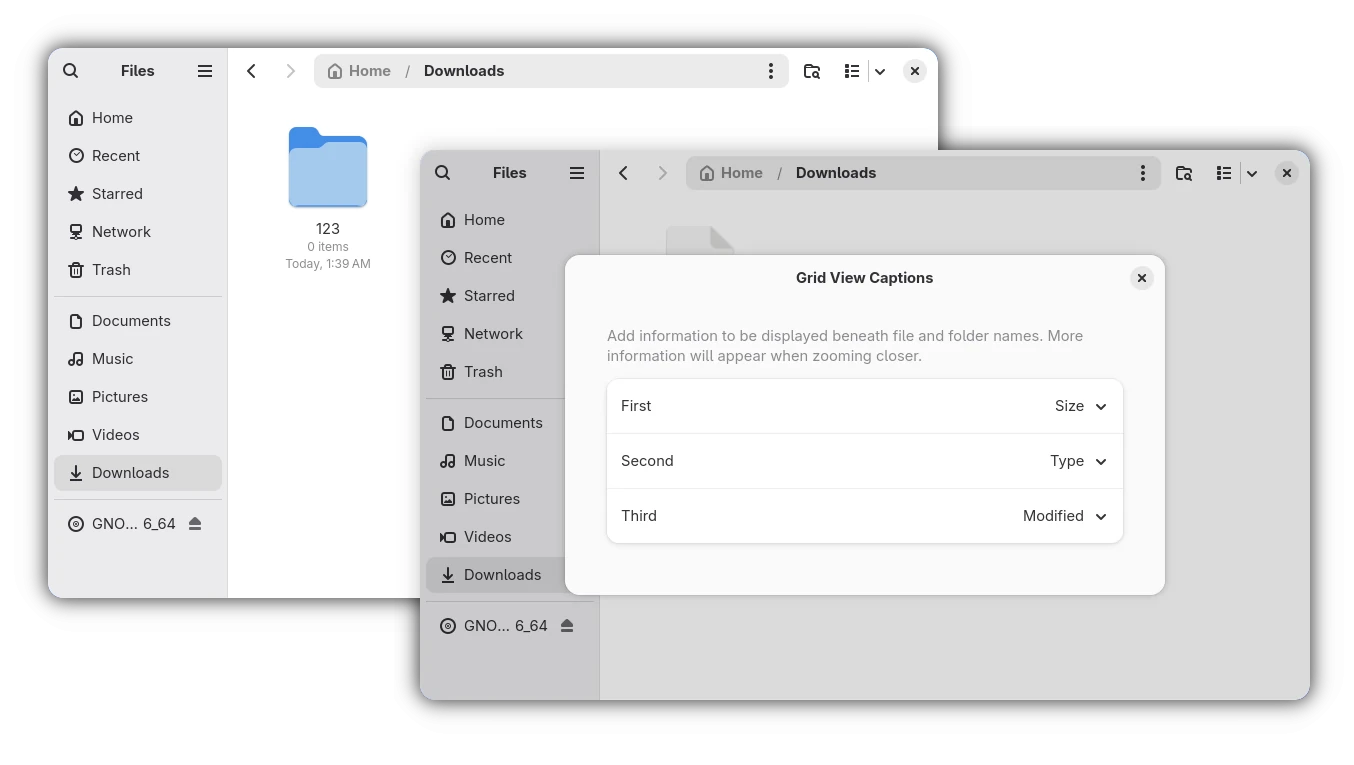
Nautilus (aka Files) now has new “Grid View Captions” configure dialog, allowing to add more captions below file/folder icons in the Grid View (aka icon view). Besides file/folder name, it can display up to 3 more rows of information, including size, type, modified date, owner, group, permissions, and so on.
And, users of earlier Gnome versions can go to /org/gnome/nautilus/icon-view/captions in “Dconf Editor” to enable this feature.
GNOME Remote Desktop in this version has been updated with HiDPI support, Kerberos authentication, remote session auto-login, as well as camera redirection, allowing to use cameras, that physically connected on the client side, inside a remote desktop session on the server side.
As well, it can now limits the global number of concurrent active connections, limits the number of concurrent active connections per peer, limits the number of new connections per second coming from a peer, and maintains a limited number of pending connections that is waiting to be handled.
Glycin, the image loading library, now supports XPM and XBM image formats, and it now use hayro-jpeg2000 loader instead of jpeg2k for JPEG 2000 image decoding.
Loupe image view has been updated with XPM and JPEG 2000 mime-types support, so it can be set as default image viewer for opening these image formats.
Orca, the screen reader, now has a new redesigned preferences dialog. All settings and commands are now global, so that user doesn’t need to save settings on a per-application basis.
Browse mode now works in all document content. Automatic language switching has been added both for web content and for UI. And, it’s now possible to keep contrated braille enabled at the cursor location, and to display object mnemonics in braille.
Other changes in GNOME 50 Beta include:
The official announcement of this Beta is not ready yet, but the detailed changes have been made available in the NEWS page.
And, the GNOME OS .iso image for the new Beta is available to download in Gnome website via the link below:
NOTE: The Gnome OS image sadly needs entire disk when installing in real machine, and only runs in Gnome Boxes when trying out in Virtual Machine.
Besides using the Gnome OS image, Arch Linux has made this Beta into Gnome Unstable repository, and Fedora has added it for current v44 and Rawhide development releases.
For Ubuntu 26.04 LTS, the developer team is building the Beta packages, which will be available in next few weeks.
NebiOS is an Ubuntu-based desktop Linux distribution with a custom Wayland compositor called NebiDE (based on Wayfire). It features various user interface enhancements, an initial setup module called OOBE, the NebiOS App Runtime (napp-runtime) portable application format with bubblewrap containerization, improved gaming performance with Steam Proton integration, a kernel switcher for easy multi-kernel installation, and the Wine compatibility layer for running some Windows applications. NebiOS is intended as a general-purpose operating system for daily computing tasks, including creative work and gaming.In this article, you will learn how to find which process or service is listening on a particular port in
The post 4 Ways to Find Out Which Process Listening on a Particular Port first appeared on Tecmint: Linux Howtos, Tutorials & Guides.
Tails 7.4.2 Linux OS is now available for download as an emergency release that fixes critical security vulnerabilities in Linux kernel, as well as other issues.
The post Tails 7.4.2 Anonymous Linux OS Released to Fix Critical Security Vulnerabilities appeared first on 9to5Linux - do not reproduce this article without permission. This RSS feed is intended for readers, not scrapers.
