
❌

Normal view

GCompris 26.0 Released with 2 New Activities & Teachers Tool

By: Ji m
7 February 2026 at 15:02

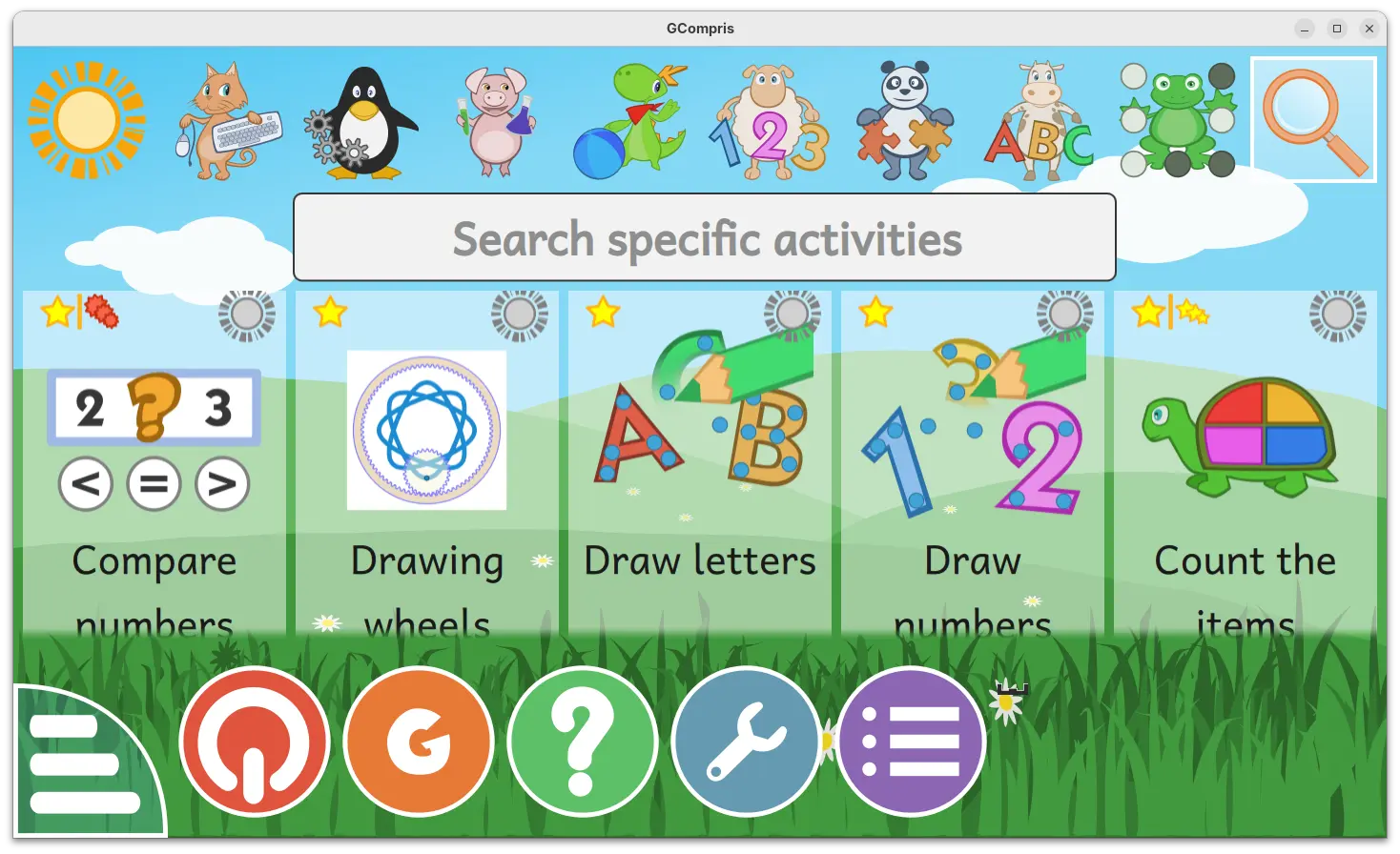
GCompris, KDE’s educational software suite, released new 26.0 version few days ago.

The new version introduced official companion tool for teachers, added two new activities, and fixed various bugs.

For those who don’t know about the software, it’s a free open-source educational software for children aged 2 to 10, which works on Linux, Windows, BSD, macOS, and Android.

It includes 190+ activities, some of them are game orientated but nonetheless still educational, providing training exercises within and outside the classroom.
With the new 26.0 version, the official teachers tool is introduced. It allows teachers to create and manage pupils groups, create specific work plans, connect and send a work plan to pupils, visualize the work results per group and pupil, and analyse pupils answers.

The GCompris-teachers app is so far only available for Linux and Windows, and teachers should use the same version of the main GCompris application.
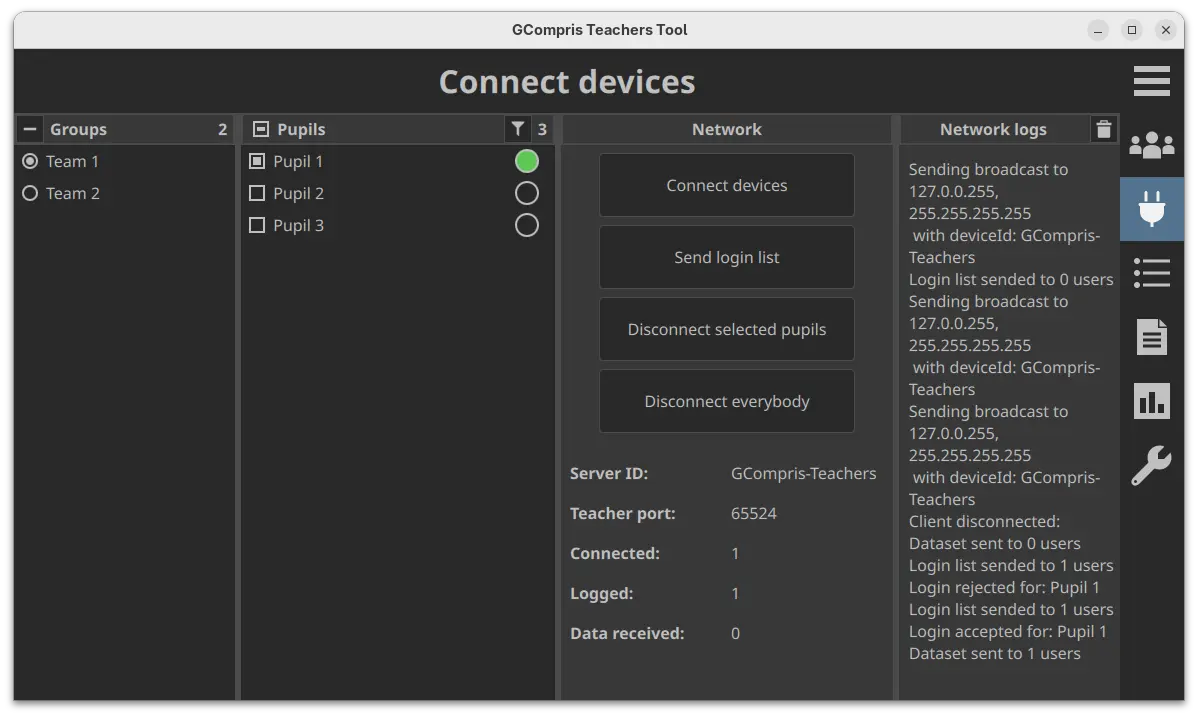
Gcompris teachers app

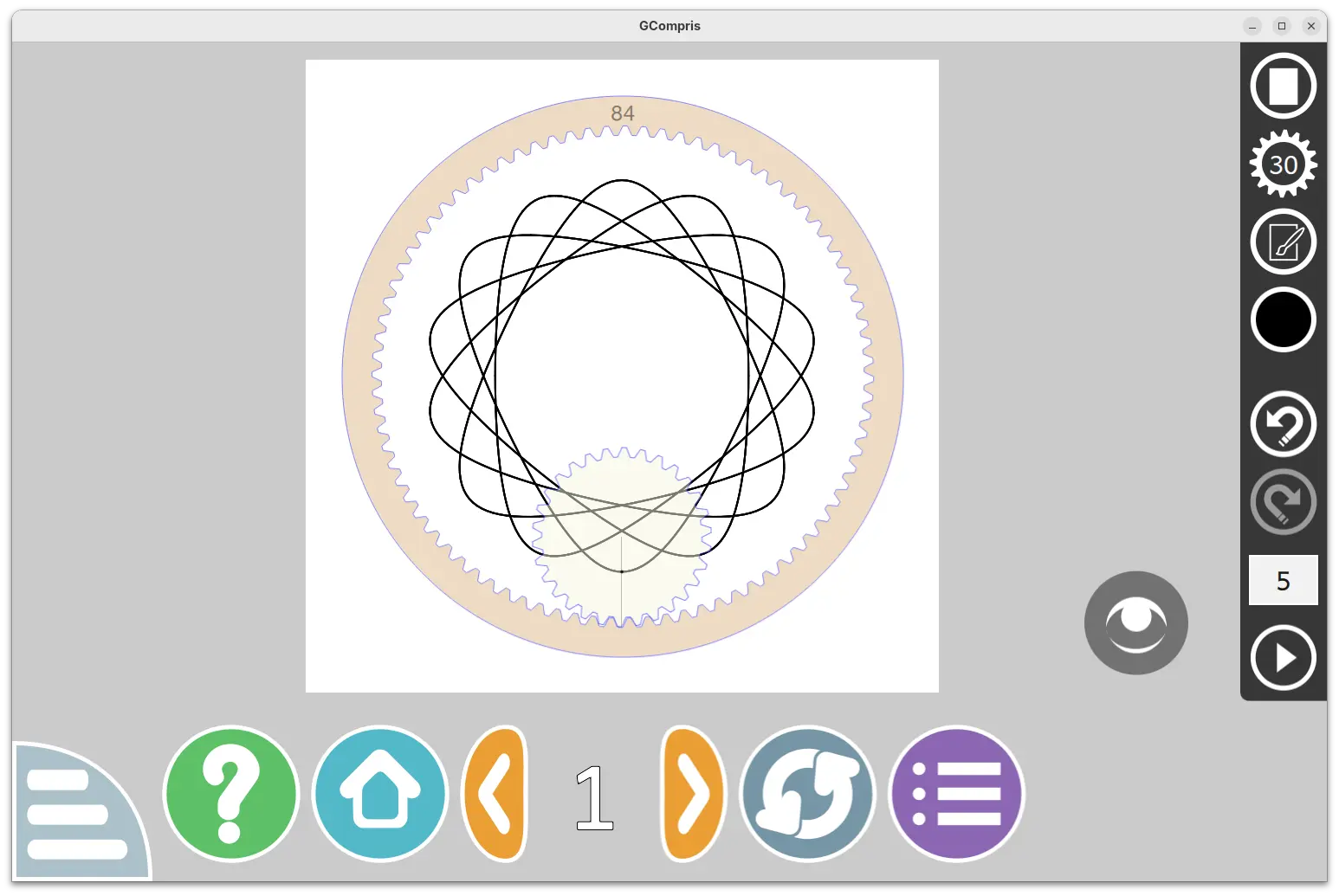
The new version also introduced two new activities. They include β€œDrawing wheels”, an activity to make beautiful drawings by rolling the gear in the cogwheel.

Pupils can choose wheel size, gear size, pen settings and color, and finally click play to roll the gear to start drawing. An eye icon is available to hide the gear and the cogwheel to view the final drawing. And, it supports saving image as SVG along with PNG, and load again (SVG only) from the activity.
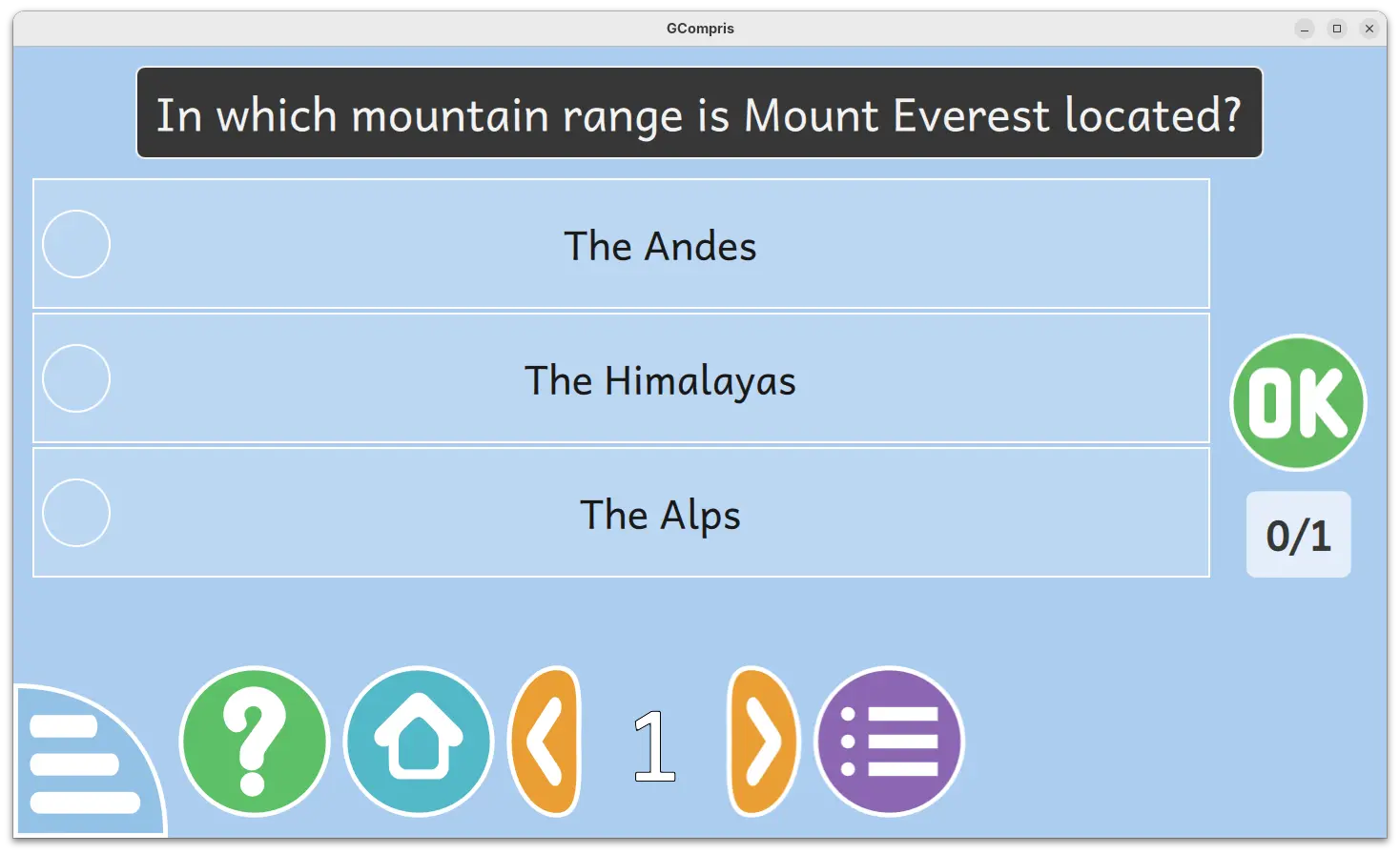
Another one is β€œMultiple choice questionsβ€œ, a MCQ activity that’s hidden by default. It’s only visible after teacher created the questions and sent to clients. Pupils need to click an answer to select then press OK to answer the questions sent by teacher. After validating, a feedback text (if set by teacher) panel will be displayed, and click anywhere will close it.
Other changes include two new Kannada and Tamil languages support, as well as bug-fixes and improvements. See the NEWs page for details.

How to Get GCompris 26.0

The software provides official installer packages for Linux, Windows, macOS, Android, and Raspberry Pi, which are available to download in its website:

For Linux, either download the .sh installer and follow the guide in the link above, or select install the Flatpak package or Snap package (from App Center).

Darktable 5.4.1 Released with Few Dozen Fixes [Ubuntu PPA Updated]

By: Ji m
7 February 2026 at 06:48

Darktable, the free open-source photography app and raw developer, released new 5.4.1 version one day ago.

This is a minor release that focuses on bug-fixes, stability improvements, as well as camera support changes and translation updates, but no new features.

First, the new version fixed possible crashes in the situations, when mounting a camera from Darktable due to the current locale, when using workspace due to the non deterministic ordering of the list of workspace read on disk, and when parsing highlight-preservation Exif tag while loading some Olympus ORF files.

It also fixed wrong handling of scaling factor during multi-preset export, wrong handling of overwrite if changed in export, and wrong RAW specific auto-applied preset being applied to non RAW images.

There are as well fixes for subtle color casts in bayer dual demosaicers, mask support in scale pixels module, and possibly outdated metadata when returning from darkroom.

Besides bug-fixes, the new version also updated Lua API to v9.6.0, added noise profiles for Canon EOS 10D and Sony ILCE-7CR.

Image by Chanzj from Pixabay

It however suspended support for Creo/Leaf Aptus 22(LF3779)/Hasselblad H1, Fujifilm IS-1, Kodak EasyShare Z980, Leaf Aptus-II 5(LI300059)/Mamiya 645 AFD, Leaf Credo 60/80, Olympus SP320, Phase One IQ250, and ST Micro STV680.

And, it misses compression mode support for Apple ProRAW DNGs, CinemaDNG lossless (Blackmagic, some DJI, etc.) and lossy (Blackmagic), DNG 1.7 using JPEG XL (Adobe enhanced, Samsung Expert RAW), Fujifilm lossy RAFs, Nikon high efficiency NEFs, Phase One other than IIQ L, and Sony ARW 4.0/5.0 downsized lossless and ARW 6.0 lossy.

How to Install Darktable 5.4.1

The official release note as well as the installers for Linux, Windows, macOS, and source tarball are available in Github via the link below:

Linux user may select download the AppImage, then add executable permission and run to launch the software.

There are as well Snap package available in Ubuntu Software (or App Center), and Flatpak package that works in most Linux. Though both of them are not updated at the moment of writing.

For those who prefer the native package formats, the official .deb/.rpm packages for Debian, Ubuntu, Fedora, and openSUSE are available to download at this page.

And, for Ubuntu users who prefer Ubuntu PPA, I’ve built the 5.4.1 version into this unofficial PPA for Ubuntu 22.04, Ubuntu 24.04, and Ubuntu 25.10.

Simply open terminal (Ctrl+Alt+T) and run the 3 commands below one by one to add PPA, refresh cache and install the deb package:

sudo add-apt-repository ppa:ubuntuhandbook1/darktable
sudo apt update
sudo apt install darktable

Krita Released 6.0 Beta with Qt6 Port & Native Wayland Support

By: Ji m
6 February 2026 at 11:34

Krita, KDE’s digital painting software, released the first Beta of the next major 6.0 and 5.3 versions yesterday.

The 2 versions were released in parallel. Krita 6 and 5.3 share all the same features, except, that 5.3 is built on top of Qt5, while 6.0 features Qt6 port and native Linux Wayland support.

Thanks to Wayland support, in particular Wayland Color Management protocol, the 6.0 Beta brings HDR support for Linux as well as fractional scaling and 10 bit display support.

Besides the Qt framework change and Wayland support, the new version also completely overhauled the Text tool. Instead of opening the edit text dialog, it finally supports on-canvas edit just like other image editors do.

It as well supports wrapped text, text in shape, text on path, and text Properties docker, allowing to configure text font family, style, font size, align, as well as few dozens other properties.

In addition to Text Properties docker, the Text tool also features glyph palette to select alternate glyphs that may be present in the currently used font, and new Type Setting Mode that provides controls to edit Font Size, Baseline Shift, Line Height and Dominant Baseline directly on canvas.

The new version as well introduced a new knife tool (Comic Panel Editing tool) for vector objects, allowing to cut through a shape with a gap width.

So far there are 3 gap widths to choose from, and it supports removing a gap (merge shapes). And, it will probably support custom gap width, snap, move the gutter etc functionalities in future releases.

Knife Tool

The Beta of Krita 5.3 and 6.0 added loading and saving support for Radiance RGB, the old but fairly widely used HDR image format.

It also added support multi-layered and multi-pages and animated JXL files, new Bundle Creator, as well as loading and saving shapes, vector masks and guides fro PSD.

Other changes include:

  • Add Fast Color Overlay filter.
  • Add Propagate Colors filter.
  • CSS palette support.
  • Multibrush β€˜Copy Translate at Intervals’ mode.
  • Add Python Painting API.
  • Ability to add dockers to the pop-up palette.
  • Real-time capturing support for the recording docker plugin.
  • Refactor blendmodes to properly support HDR modes.
  • Transform shortcuts support for multi-selected layers.
  • Rotate the transform bounding box with ctrl+alt.

For more about the new versions, see the official release note.

Get Krita 5.3/6.0 Beta

The source tarballs, as well as the official packages for Linux, Windows, macOS, and Android are available to download in KDE website via the link below:

For Linux on Intel/AMD platform, select download the .AppImage, then add executable permission and run the launch the image editor.

Tips: Ubuntu since 22.04 needs to install libfuse2 for AppImage support by running the command below in terminal (Ctrl+Alt+T):

sudo apt install libfuse2

❌