 Login
Login
GNOME 50 Beta is out! Enhanced Remote Desktop & Orca Support

GNOME 50, the default desktop environment for Ubuntu 26.04 and Fedora 44 Workstation, now is available for Beta testing, while the final release is planned for March 18th, 2026.
The last Alpha introduced first day of a week setting option which can be configured by gsettings command. This Beta improved the feature by adding an option in Gnome Control Center (aka Settings) -> System -> Date & Time, allowing to configure it graphically.
Thanks to Wellbeing developers, Parental Controls app now supports setting daily screen time limit and bedtime for children’s accounts. And, a “ignore” button is available in the lock screen allowing parents to extend the computer time.
Set daily screen time limit and bedtime
Variable Refresh Rate (VRR), the feature introduced since Gnome 46 that allows monitor to change its refresh rate dynamically to match GPU frame rate, and fractional scaling are now no-longer treated as experimental.
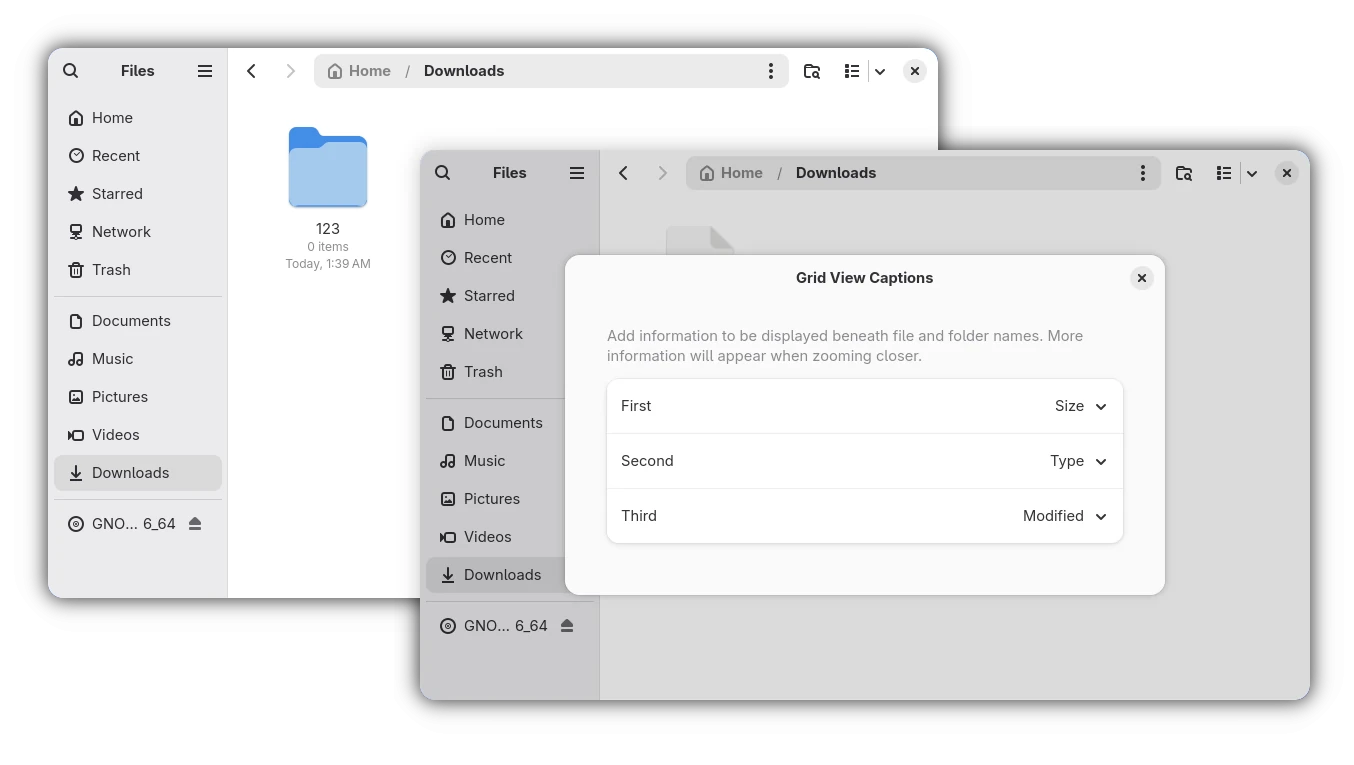
Nautilus (aka Files) now has new “Grid View Captions” configure dialog, allowing to add more captions below file/folder icons in the Grid View (aka icon view). Besides file/folder name, it can display up to 3 more rows of information, including size, type, modified date, owner, group, permissions, and so on.
And, users of earlier Gnome versions can go to /org/gnome/nautilus/icon-view/captions in “Dconf Editor” to enable this feature.
GNOME Remote Desktop in this version has been updated with HiDPI support, Kerberos authentication, remote session auto-login, as well as camera redirection, allowing to use cameras, that physically connected on the client side, inside a remote desktop session on the server side.
As well, it can now limits the global number of concurrent active connections, limits the number of concurrent active connections per peer, limits the number of new connections per second coming from a peer, and maintains a limited number of pending connections that is waiting to be handled.
Glycin, the image loading library, now supports XPM and XBM image formats, and it now use hayro-jpeg2000 loader instead of jpeg2k for JPEG 2000 image decoding.
Loupe image view has been updated with XPM and JPEG 2000 mime-types support, so it can be set as default image viewer for opening these image formats.
Orca, the screen reader, now has a new redesigned preferences dialog. All settings and commands are now global, so that user doesn’t need to save settings on a per-application basis.
Browse mode now works in all document content. Automatic language switching has been added both for web content and for UI. And, it’s now possible to keep contrated braille enabled at the cursor location, and to display object mnemonics in braille.
Other changes in GNOME 50 Beta include:
- VA-API disabled in Remote Desktop when using AMD GPU.
- Support “unified” authentication mechanism for GDM.
- No longer treat “Service Unavailable” errors from PAM modules as failed login attempts.
- Add text-size setting with adjustable slider.
- Use glycin for thumbnails in Nautilus (Files).
- Add HiDPI & monitor mode emulation support in screen cast API / Devkit
- Add way in remote desktop API to set the active keyboard layout
Get GNOME 50 Beta
The official announcement of this Beta is not ready yet, but the detailed changes have been made available in the NEWS page.
And, the GNOME OS .iso image for the new Beta is available to download in Gnome website via the link below:
NOTE: The Gnome OS image sadly needs entire disk when installing in real machine, and only runs in Gnome Boxes when trying out in Virtual Machine.
Besides using the Gnome OS image, Arch Linux has made this Beta into Gnome Unstable repository, and Fedora has added it for current v44 and Rawhide development releases.
For Ubuntu 26.04 LTS, the developer team is building the Beta packages, which will be available in next few weeks.