
โŒ

Normal view

Linux Kernel 6.19 Released with Many New Hardware Support

By: Ji m
9 February 2026 at 15:27

Linux Kernel 6.19 was released! Linus Torvalds announced the kernel release on Sunday afternoon:

No big surprises anywhere last week, so 6.19 is out as expected โ€“ just as the US prepares to come to a complete standstill later today watching the latest batch of televised commercials. The betting man would expect them all to be AI-generated, but maybe some enterprising company decides to buck the trend? Doubtful, but thereโ€™s always a slight chance.

โ€ฆ

Whatโ€™s New in Kernel 6.19

The new kernel added initial support for Tenstorrent Blackhole, the high-performance AI processor and PCIe accelerator family designed by Tenstorrent.

It also added 32-bit version of LoongArch processors support, initial support for Black Sesame C1200 SoC designed for integrate intelligent driving.

For Intel, the new kernel added audio support for the upcoming Core Ultra Series 4 processors (Nova Lake). It added new imh_edac EDAC driver for Xeon Diamond Rapids processors, Linear Address Space Separation (LASS) hardware security feature, as well support the Intel microcode staging feature to deal with large microcode binary.

AMD now has Zen 6 RAS (Reliability, Availability and Serviceability) preparation, and Smart Data Cache Injection (SDCI) support, allows for data to be inserted from the I/O devices into the L3 cache directly. And, it improved AES-GCM crypto performance for up to 74% faster for AMD Zen 3 processors.

Image by anirudhlv from Pixabay

For ARM64, it features new MPAM driver for managing shared memory resources useful for servers with multi-user virtual machines. RISC-V now supports CPU hot-plugging in parallel for secondary CPU cores, so it can dynamically enable/disable CPU cores while the system is running.

The Linux graphics now supports Color Pipeline API for hardware-accelerated and standardized color management.

It added initial Intel Xe3P graphics support, initial GPU Support For Snapdragon X2 Elite and Adreno X2-85 GPUs. And, it now uses AMD GCN 1.0 and GCN 1.1 GPUs by default to the AMDGPU driver rather than the legacy Radeon DRM driver.

Other hardware support include:

  • Logitech G Pro X Superlight 2.
  • Logitech G13 gaming keypad.
  • Legion Go 2 handheld
  • StarFive VisionFive 2 Lite.
  • XP-PEN Artist 24 Pro drawing tablet.
  • Realtek RTL8125K, RTL8922DE, RTL8852AU and RTL8852CU.
  • Lenovo ThinkBook 16 with the Snapdragon X Plus X1P42100 SoC
  • Acer WMI driver for the PH16-72, PHN16-72, and PT14-51 laptop models.
  • ASUS Zenbook A14 with Snapdragon X Plus X1P42100 SoC
  • Backlight brightness control for Logitech G510 keyboard.
  • Enhance support for ROG Ally gaming handhelds and other ASUS enthusiast/gaming devices.
  • Fan control on the Dell G5 5505.
  • Hardware monitoring support for Apple Silicon SMC.
  • Rapid Charge mode support for ThinkBook/IdeaPad laptops.
  • Real Time Clock (RTC) driver support for Apple and NVIDIA hardware.
  • Uniwill laptop driver for battery charge rate limiting, RGB light-bar control, and hardware monitoring. better hotkey handling.
  • USB3 support for Apple Silicon devices.
  • Temperature monitoring for Steam Deck.
  • Monitoring support for ROG STRIX X470-I GAMING, ROG STRIX X870-F GAMING WIFI, ROG STRIX X870E-H GAMING WIFI7, and Pro WS TRX50-SAGE WIFI, ASUS ROG STRIX X870E-H GAMING WIFI7.

For more about Kernel 6.19, see the great review on phoronix.com.

How to Install Linux Kernel 6.19

The source tarball for the new kernel is available to download in kernel.org.

For Ubuntu, thereโ€™s a testing purpose mainline PPA though itโ€™s not updated at the moment of writing. The next will be Linux Kernel 7.0, and Ubuntu 26.04 LTS will likely to ship that kernel out-of-the-box.
VS Code 1.109 Released with Claude Agent Support (Preview)

By: Ji m
8 February 2026 at 14:05

Visual Studio Code 1.109, the January 2026 release of Microsoftโ€™s AI code editor, was released few days ago.

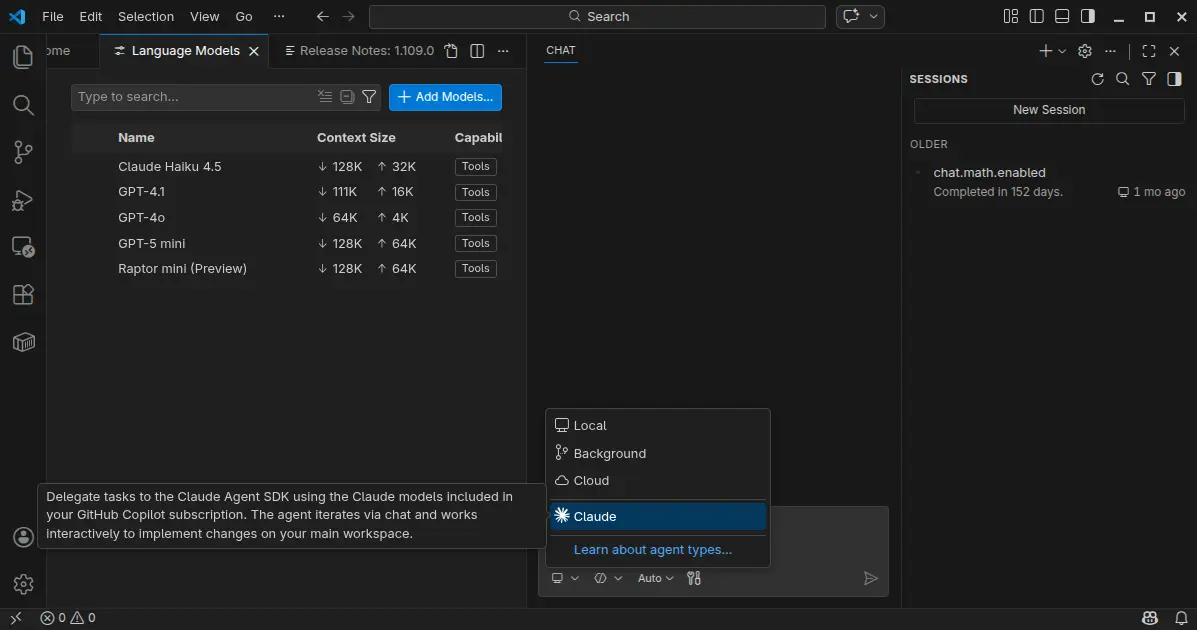
The new monthly release introduced preview support for Claude Agent, allowing to delegate tasks to the Claude Agent SDK using the Claude models included in your GitHub Copilot subscription.

It also improved the agent extensibility by allowing different agents to use different models, run independent tasks in parallel across multiple sub-agents, as well as MCP apps support for servers to display rich and interactive UI in the client.

Anthropic models now support thinking tokens to give more visibility into the modelโ€™s reasoning process. User can choose between detailed or compact thinking styles, see the modelโ€™s thought process interleaved with tool calls and responses, and, failing tool calls automatically expand to show more context.

The Anthropic models now use the Messages API with interleaved thinking support, and support for context editing to help manage longer conversations more efficiently.

Chat responses can now render interactive Mermaid diagrams with the renderMermaidDiagram tool. User can interact with pan and zoom action to explore them in detail, or open them in a full-sized editor for easier viewing.

The new version now allows to run multiple agent sessions in parallel across local, background, and cloud environments. It added a new session type picker in the chat input area to switch between these different agent types, and a new agent status indicator in the command center to provide visibility into agent session updates.

Agents can run subtasks using subagents to break down complex tasks into smaller parts. Cloud agent session now supports model selection, third-party coding agents (Preview), and custom agents available in your target GitHub repository default branch. Background agent session as well supports custom agent, attaching images as context, and auto-commit at the end of each turn.

Agent Skills that was introduced in the last release, are now generally available and enabled by default. And, you can now manage skills in VS Code in the same way you manage prompt files, instructions, or custom agents.

This version as well added /init slash command to generate or update your workspace instructions in chat, organization-level custom instructions support, and new controls for custom agent file locations, how agents can be invoked, and specify multiple model for custom agents.

It optimized agent with new Copilot Memory (preview feature) to store and recall important information across sessions, ability to index workspaces that are not hosted on GitHub, and read files and list directories outside current workspace with user permission.

For Linux and macOS, thereโ€™s also experimental terminal sandboxing feature to restrict file system access to only your workspace folder and restrict network access to trusted domains only.

VS Code desktop also features a new integrated browser (preview), allowing to sign into websites and browse any web page, just like you would in a regular browser.

Other changes in VS Code 1.109 include:

  • Ask Questions tool (Experimental).
  • Fully interactive embedded terminals.
  • New Agent sessions welcome page (Experimental).
  • Kitty keyboard protocol support.
  • Dragโ€™nโ€™drop importing a settings profile.
  • Provide DMG images for macOS.
  • Windows 11 context menu integration.

Get VS Code 1.109

The official release note, as well as the download links for Linux, Windows, and macOS are available via the link below:

Ubuntu users can either simply search & install the Snap package from App Center (or Ubuntu Software for 22.04), or download and install the deb package from the link above.

And, a community maintained flatpak package is available for choice with most Linux support. See this guide for how to install them step by step.

โŒ