
 Login
Login
VS Code 1.109 Released with Claude Agent Support (Preview)

Visual Studio Code 1.109, the January 2026 release of Microsoft’s AI code editor, was released few days ago.
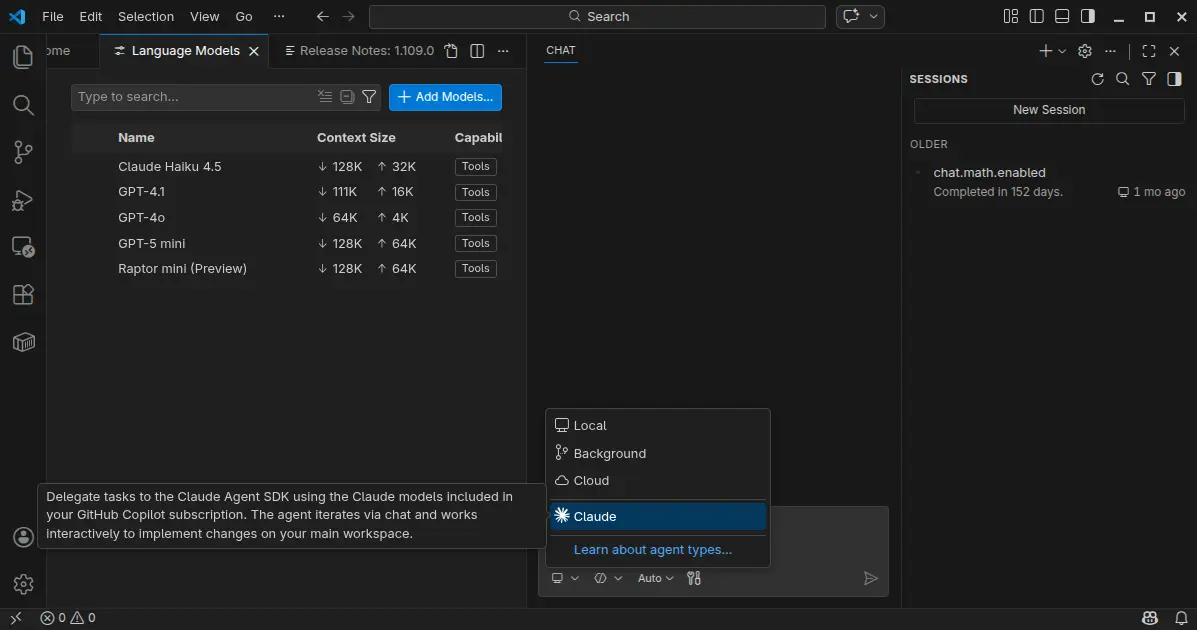
The new monthly release introduced preview support for Claude Agent, allowing to delegate tasks to the Claude Agent SDK using the Claude models included in your GitHub Copilot subscription.
It also improved the agent extensibility by allowing different agents to use different models, run independent tasks in parallel across multiple sub-agents, as well as MCP apps support for servers to display rich and interactive UI in the client.
Anthropic models now support thinking tokens to give more visibility into the model’s reasoning process. User can choose between detailed or compact thinking styles, see the model’s thought process interleaved with tool calls and responses, and, failing tool calls automatically expand to show more context.
The Anthropic models now use the Messages API with interleaved thinking support, and support for context editing to help manage longer conversations more efficiently.
Chat responses can now render interactive Mermaid diagrams with the renderMermaidDiagram tool. User can interact with pan and zoom action to explore them in detail, or open them in a full-sized editor for easier viewing.
The new version now allows to run multiple agent sessions in parallel across local, background, and cloud environments. It added a new session type picker in the chat input area to switch between these different agent types, and a new agent status indicator in the command center to provide visibility into agent session updates.
Agents can run subtasks using subagents to break down complex tasks into smaller parts. Cloud agent session now supports model selection, third-party coding agents (Preview), and custom agents available in your target GitHub repository default branch. Background agent session as well supports custom agent, attaching images as context, and auto-commit at the end of each turn.
Agent Skills that was introduced in the last release, are now generally available and enabled by default. And, you can now manage skills in VS Code in the same way you manage prompt files, instructions, or custom agents.
This version as well added /init slash command to generate or update your workspace instructions in chat, organization-level custom instructions support, and new controls for custom agent file locations, how agents can be invoked, and specify multiple model for custom agents.
It optimized agent with new Copilot Memory (preview feature) to store and recall important information across sessions, ability to index workspaces that are not hosted on GitHub, and read files and list directories outside current workspace with user permission.
For Linux and macOS, there’s also experimental terminal sandboxing feature to restrict file system access to only your workspace folder and restrict network access to trusted domains only.
VS Code desktop also features a new integrated browser (preview), allowing to sign into websites and browse any web page, just like you would in a regular browser.
Other changes in VS Code 1.109 include:
- Ask Questions tool (Experimental).
- Fully interactive embedded terminals.
- New Agent sessions welcome page (Experimental).
- Kitty keyboard protocol support.
- Drag’n’drop importing a settings profile.
- Provide DMG images for macOS.
- Windows 11 context menu integration.
Get VS Code 1.109
The official release note, as well as the download links for Linux, Windows, and macOS are available via the link below:
Ubuntu users can either simply search & install the Snap package from App Center (or Ubuntu Software for 22.04), or download and install the deb package from the link above.
And, a community maintained flatpak package is available for choice with most Linux support. See this guide for how to install them step by step.
